Website and search reporting
Present GA4 performance and Search Console visibility in one reporting workspace, without presenting aggregate relationships as individual conversion attribution.
For marketing agencies and freelancers
Bring website performance, search visibility, and lead reporting into one client-ready Looker Studio workspace.
$49 one-time · Rebrand it · Use it across client accounts
Self-service template. CRM data is maintained in Google Sheets unless you add a separate integration. No support or future updates included.
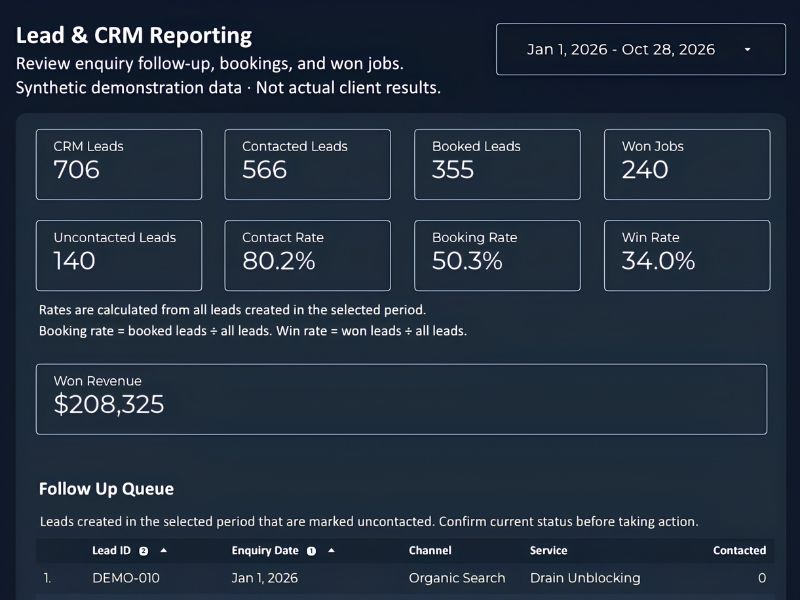 View the lead reporting preview
See the product
Browse website, SEO, and lead reporting. Select any screenshot to open the full-size image in a new tab. Sample data is shown for demonstration, not as a promise of results.
Explore how visitors arrive and how landing-page performance is presented.
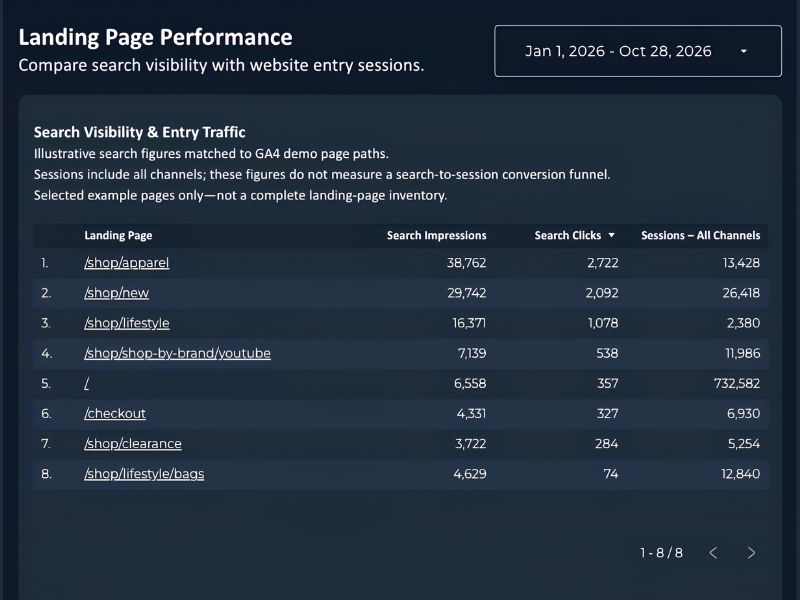
Compare search visibility and website entry sessions by landing page.
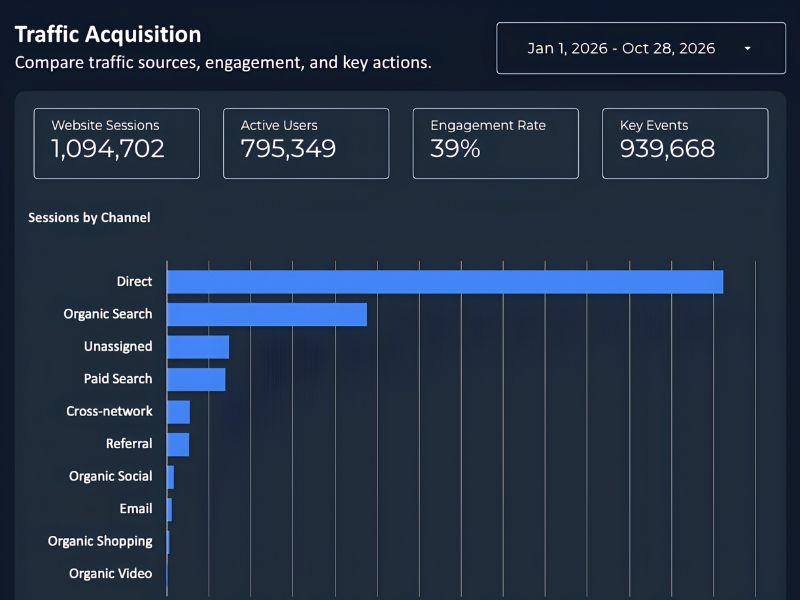
Compare channels, website sessions, engagement, and key events in one clear view.
See the SEO summary and the query and page tables in more detail.
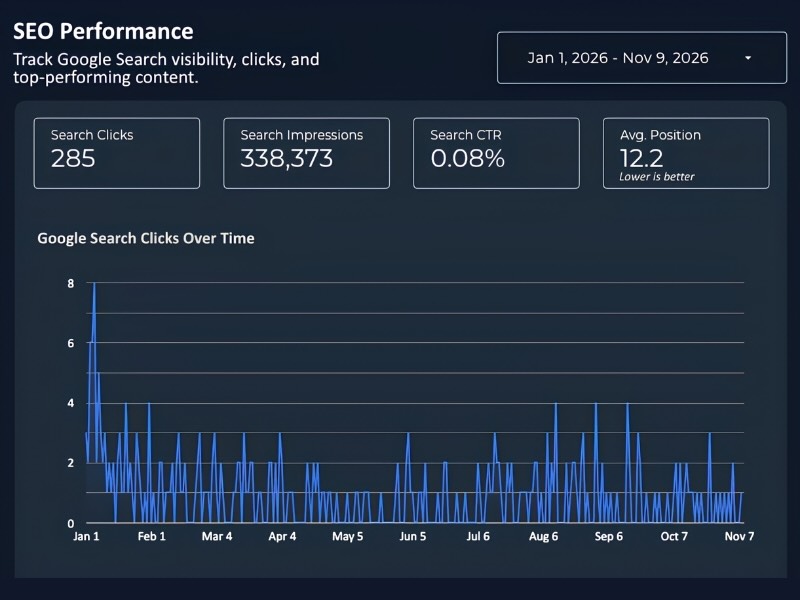
Review search-performance scorecards and trends in one overview.
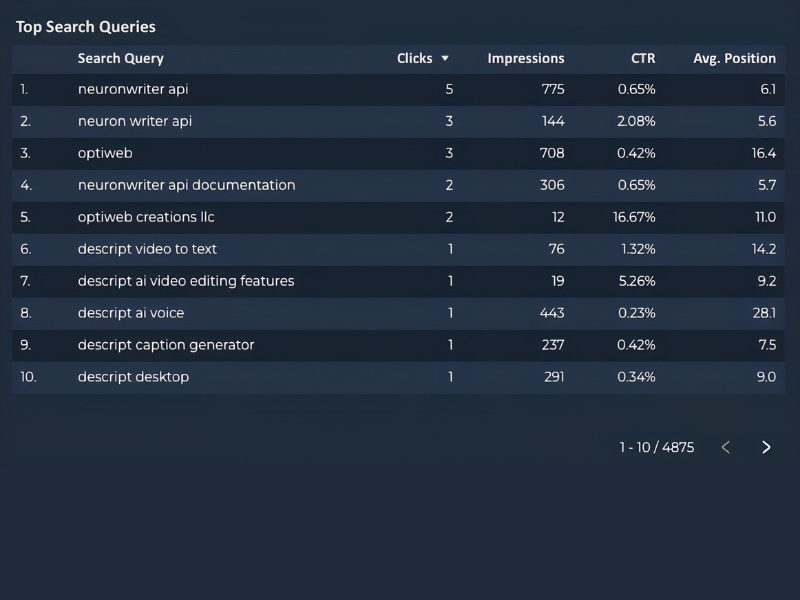
Inspect the search-query table alongside the SEO overview. Query reporting does not establish individual conversion attribution.
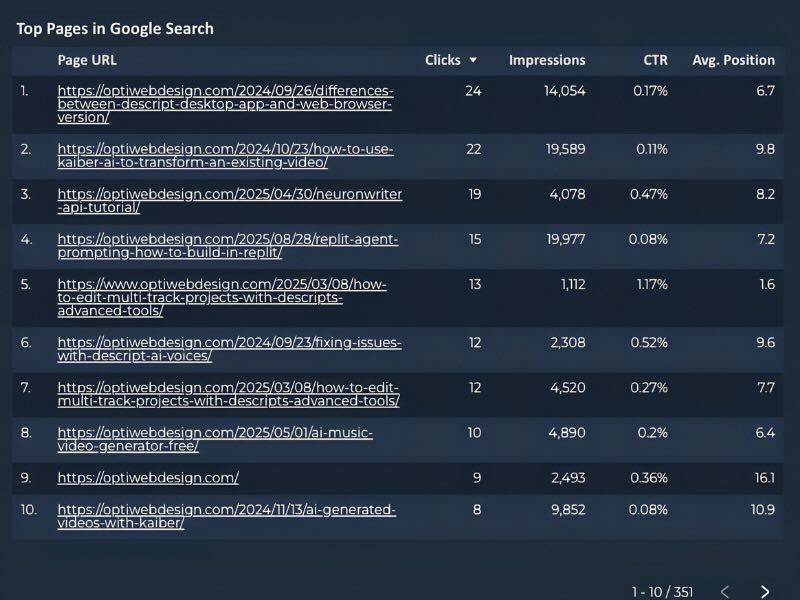
Explore page-level search reporting and compare the listed pages.
Move from summary metrics to the follow-up queue and individual pipeline records.
Present lead counts, contact and booking rates, won jobs, and recorded revenue together.
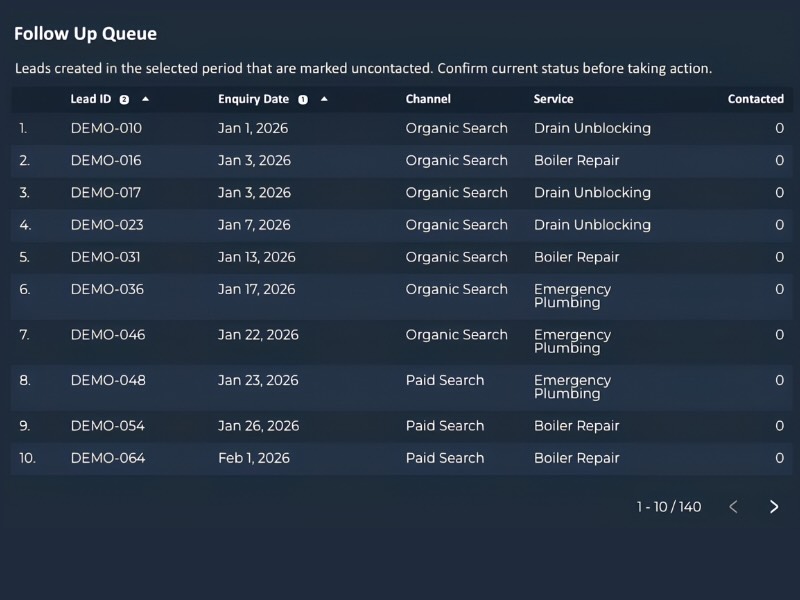
Inspect the records shown in the follow-up queue. Confirm current status before taking action.
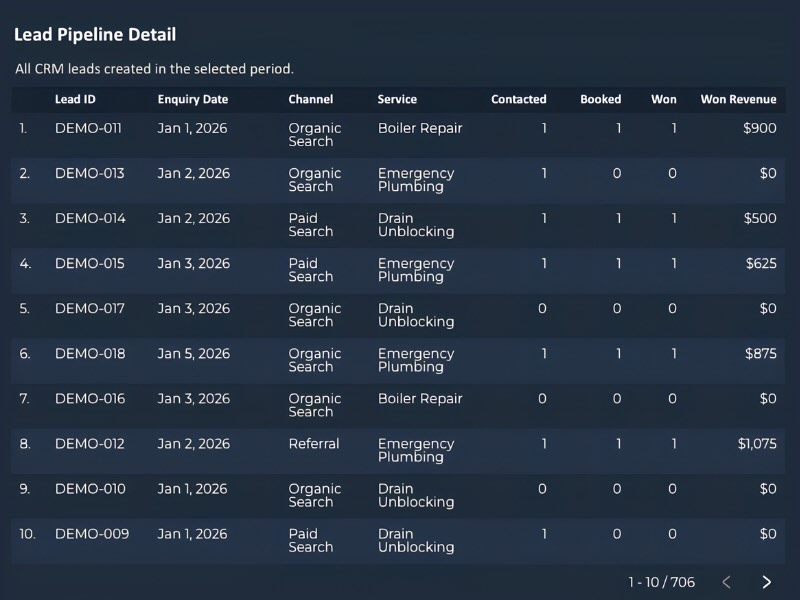
Review individual pipeline records alongside the summary view. CRM records are maintained in the included Sheets workflow unless separately automated.
Ready to make it your own?
Get the Template — $49The $49 purchase
A self-service reporting template, not a managed analytics service or a live CRM integration.
No template resale or standalone redistribution. Setup support, future updates, and custom integrations are not included.
Setup at a glance
Allow time to configure your data sources and check the results before sharing reports.
Use the Get Started PDF to create your working dashboard copy and prepare the supporting Sheets workflow.
Follow the guide to configure GA4 and Search Console reporting. Populate the lead tracker and any Sheet-based inputs required for blended reporting.
Customize the presentation, select the reporting period, and check totals against your source accounts before delivering a client report.
Present GA4 performance and Search Console visibility in one reporting workspace, without presenting aggregate relationships as individual conversion attribution.
Use the Google Sheets lead-tracking workflow to organize contact rates, booking rates, pipeline value, and recorded revenue. CRM entry is manual unless separately automated.
A dark dashboard design and period comparisons make reporting easier to present. Customize the branding and reuse your setup across client accounts.
Requirements and data flow
You need a Google account, access to the relevant reporting properties, and permission to use the data you connect.
GA4 and Google Search Console supply the website and search metrics. The reporting design uses Google Sheets for its Sheet-to-Sheet blending workflow; follow the Get Started PDF for the source configuration and input steps.
Maintain the lead records in the Google Sheets tracker. A CRM is optional. Excel records can be prepared in the required Sheets format; no automatic Excel synchronization is included.
Looker Studio uses each source’s default data freshness settings. That does not automatically populate or refresh upstream Sheets. Manual inputs remain manual unless you arrange a separate automation.
License, delivery, requirements, and purchase terms.
Yes. You may use and customize the template for your own business and multiple client accounts. You may rebrand the dashboard and deliver reports to clients. You may not resell or redistribute the template itself as a standalone product.
No. You can use the reporting workflow with Google Analytics and Google Sheets. If you maintain records in Excel, prepare the relevant data in the required Google Sheets format. A live Excel or CRM integration is not included.
No paid connectors, add-ons, or subscriptions are required for the included template workflow. You will need access to your reporting accounts and Google Sheets. Separately commissioned automation may involve third-party platform costs.
The report uses the default Looker Studio data freshness settings for its connected sources. Refresh timing varies by connector and source processing. Refreshing a report does not update manually maintained Sheets or import new CRM records; those source records must be updated separately. This is not a real-time reporting product.
No. Search Console query reporting and GA4 conversion reporting provide complementary views. Aggregated reporting does not establish which individual search query caused a particular conversion.
It helps present website performance alongside lead, booking, pipeline, and recorded revenue information. Pipeline value is not closed-won revenue, and the template does not independently prove causal attribution or financial return on investment.
You receive the dashboard Get Started PDF and a direct link to the Looker Studio dashboard. The guide explains how to get started with your own copy and data.
No. This is a self-service template purchase. Individual setup support and future updates are not included. Custom automation services are available separately.
All sales are final. No refunds are offered, except where required by applicable law. Please review the previews, requirements, and license before purchasing.
Optional service · Quoted separately
The template works with a manually maintained Google Sheets tracker. If you want to remove that manual entry, Syntax Automations can scope a separate CRM-to-Sheets workflow.
We assess platform access, API availability, permissions, and reporting needs before proposing an integration. Compatibility with tools such as ServiceTitan, Jobber, or GoHighLevel depends on the specific account and workflow.
Discuss a custom automationCustom development and any third-party platform costs are separate from the template purchase.
One-time template purchase
Get the Looker Studio dashboard link and Get Started PDF for $49. Customize the branding and use the template across your client accounts.
Get the Template — $49Self-service. No support or future updates. No template resale. All sales final, except where applicable law requires otherwise.
Review purchase details